> For the complete documentation index, see [llms.txt](https://docs.sfbx.io/llms.txt). Markdown versions of documentation pages are available by appending `.md` to page URLs; this page is available as [Markdown](https://docs.sfbx.io/configuration/step-2-create-a-notice/2.2-add-a-notice/configure-a-web-notice.md).
# Configure a web notice
***
{% hint style="info" %}
Before creating your notice, you need to have a valid source declared in AppConsent.
See section [**Create a source**](/configuration/step-2-create-a-notice/2.1.-create-a-source.md) in order to learn how to create a new source
{% endhint %}
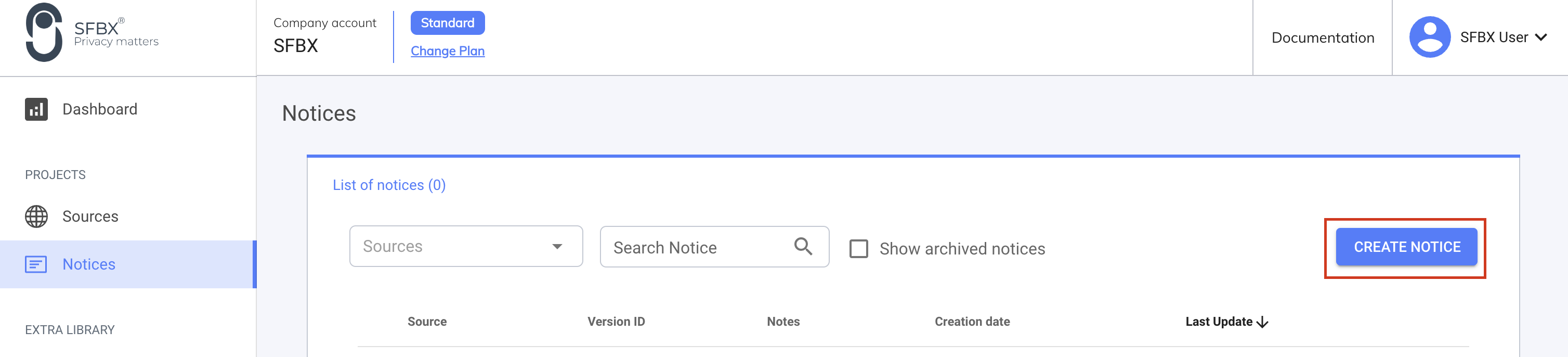
In the left menu, click on **Notices** and then on **CREATE NOTICE**.
## **Settings**
* **Source**: Select the source you want to attach the notice to. Notice is always linked to one source.
* **Notes**: Add the comments you want. It’s a reminder for your own usage and it will not be displayed anywhere in the notice.
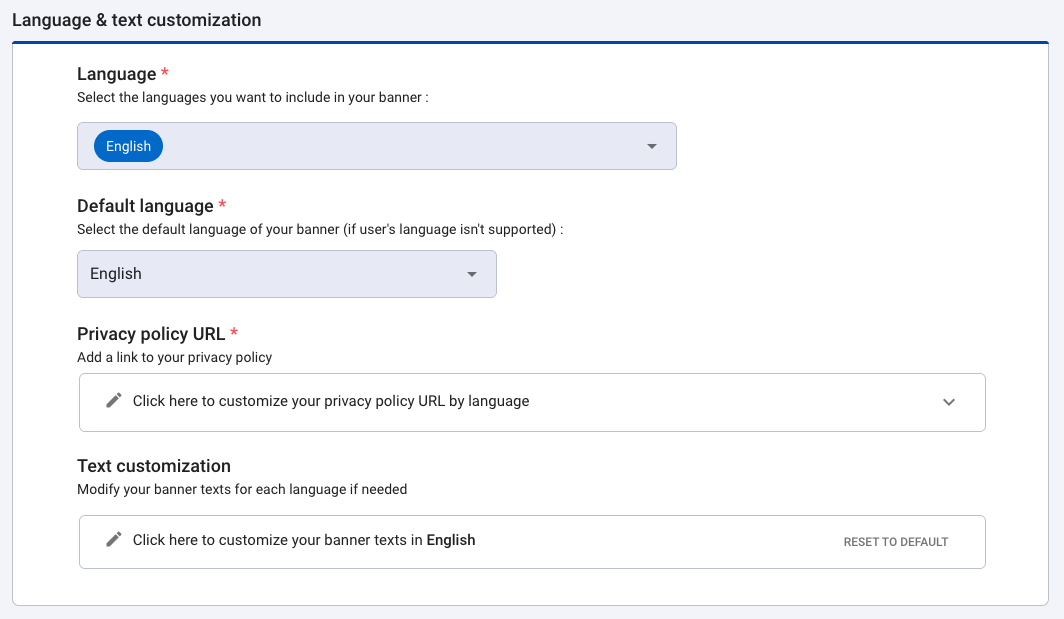
## **Language & text customization**
### Languages
Select the language you want to be included in your notice. Languages available for web notice:
* English
* French
* Spanish
* Italian
* German
* Dutch
* Portuguese
* Polish
* Bulgarian
* Czech
* Catalan
* Swedish
* Danish
* and 36 other languages available
### Default language
This language will be used if the browser language is not configured in one of the languages included in the notice.
By default, a new notice is configured in English only. But you can add other languages and translations.
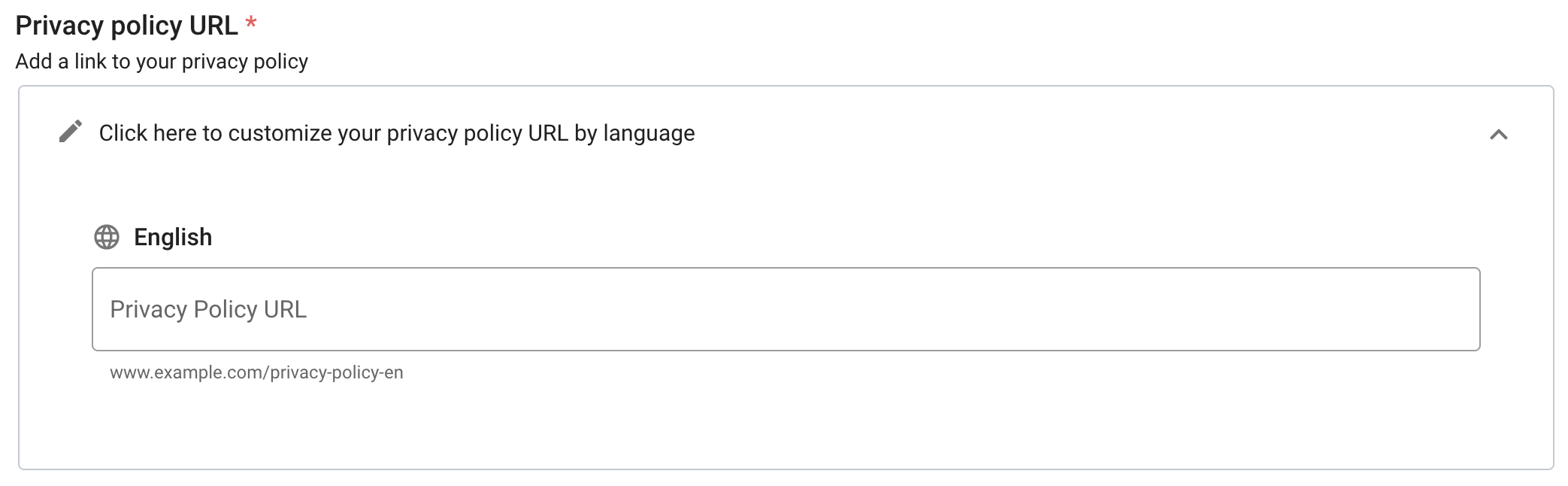
### Privacy policy URL
Add the link to your privacy policy for each of the languages selected above. This link will be automatically added to the **"See more paragraph" banner** field in the text customization section once the notice has been created.
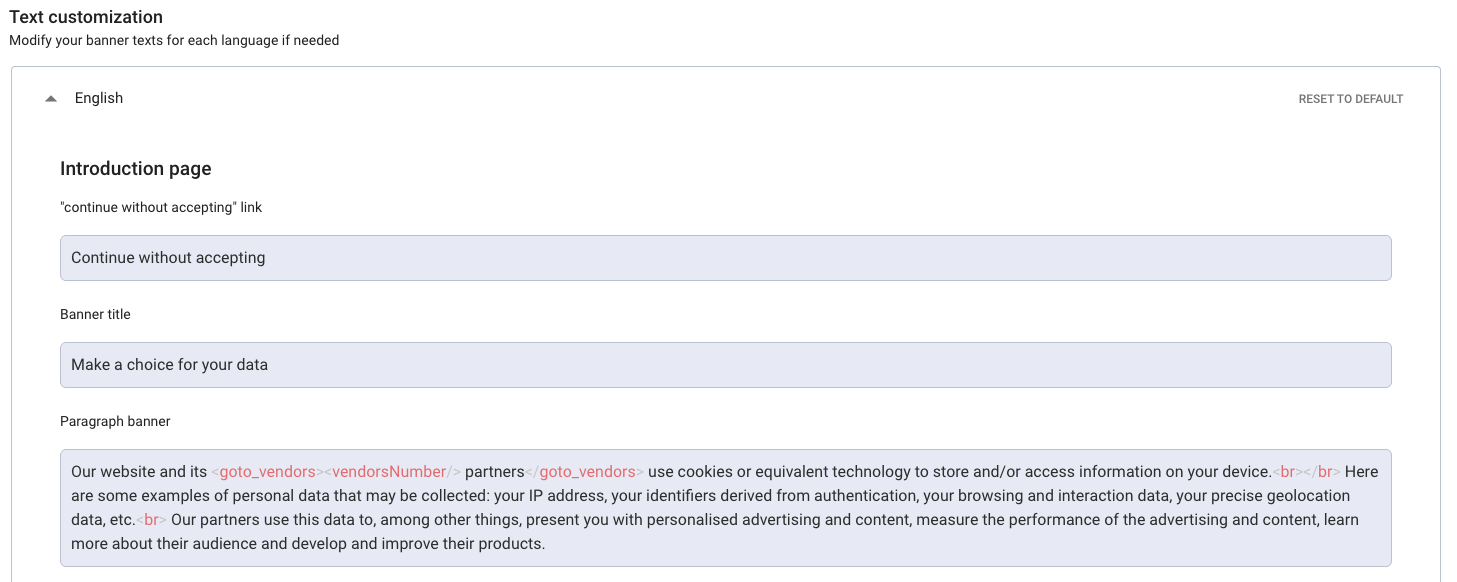
### Text customization
In each language tab, you will find all text of your notice. You can modify them. But you can also reset the default texts by clicking on **Reset to default**.
{% hint style="warning" %}
**IMPORTANT**
Please note that the default text of the banner **banner\_moreDetails\_paragraphs** field does not mention your link to your privacy policy page.
If the `` tag is not present in the **"See more paragraph" banner** field, be sure to add your own link by completing the `` tag.
{% endhint %}
It is possible to create links in text to redirect users to other parts of the notice. For this, two tags are available:
* **\**: Allows to create a redirection link to the list of all partners (vendors) that are present in the notice.
* Note: The **\** tag is deprecated, use **\** instead
* **\**: Allows to create a redirection link to consent settings page
The titles of the IAB purposes and their definitions can't be changed. It's due to the IAB TCF compatibility with their Term & Privacy policies.
## **Banner layout**
### Display layout
Choose between a bottom banner or a middle modal window.
### Consent buttons
* Choose the buttons and their order on the introduction page
* Choose to add or not the "Continue without accepting" button so that the user can leave the notice without making a choice. By default, it is a link "continue without accepting" placed at the top right of the window.
{% hint style="info" %}
**NOTE**
From April 1st, 2021, the "Refuse All" button is mandatory in France. To learn more about the new guidelines of the CNIL since April 1st, you can have a look at our [dedicated article](https://sfbx.io/2021/03/21/la-cnil-renforce-ses-lignes-directrices-sur-lusage-des-cookies-mais-sfbx-avait-deja-pense-a-tout-ou-presque/)
{% endhint %}
#### Continue without accepting & consent buttons
The Continue without accepting button and the banner action (the set of consent buttons shown on your banner) are linked.
When Continue without accepting is enabled, only the banner layouts without a Deny button are allowed (Accept / Configure and Configure / Accept). All layouts that include a Deny button are disabled in the selector.
### Illustration
### Vertical buttons
The Vertical buttons option lets you stack your consent buttons (Accept, Refuse, Configure…) on top of each other instead of displaying them side by side. The option works on both modal banners and bottom banners.
When your notice uses a bottom banner and Vertical buttons is enabled, an extra setting appears: Vertical buttons position for bottom banner.
### Illustration
Choose to display illustrations or not on your banner. (only available for Clear banner). The default image is the one provided by SFBX, but you can customize it using the three upload fields below the activation switch.
### Success Screen
Activate this option if you want the following screen when the user goes beyond the introduction screen and makes mixed choices.
**Customise the success screen image that will be displayed on your banner** : If you have chosen to display a success screen, choose the image to be displayed on it.
### Display purposes list on layer 1
*\[ Standard, Essential & Premium Plans]*
Choose to display or hide the list of processing purposes used by you and your partners on the main page of the banner.
{% hint style="danger" %}
**IMPORTANT**
Please note that the IAB TCF (Transparency and Consent Framework) and the various European DPAs require the purposes of processing to be displayed. If you deactivate this option, it is your responsibility to inform your users in an appropriate manner about the purposes for which their personal data is processed.
{% endhint %}
#### Purposes list display mode
When the purposes list is displayed, you can choose how it appears on the main page of the banner.
* Display purposes list as a dedicated list (default): the processing purposes are shown as a separate, structured list on the banner's main page.
* Display purposes list within the banner text: the processing purposes are listed inline, directly inside the banner's introductory paragraph.
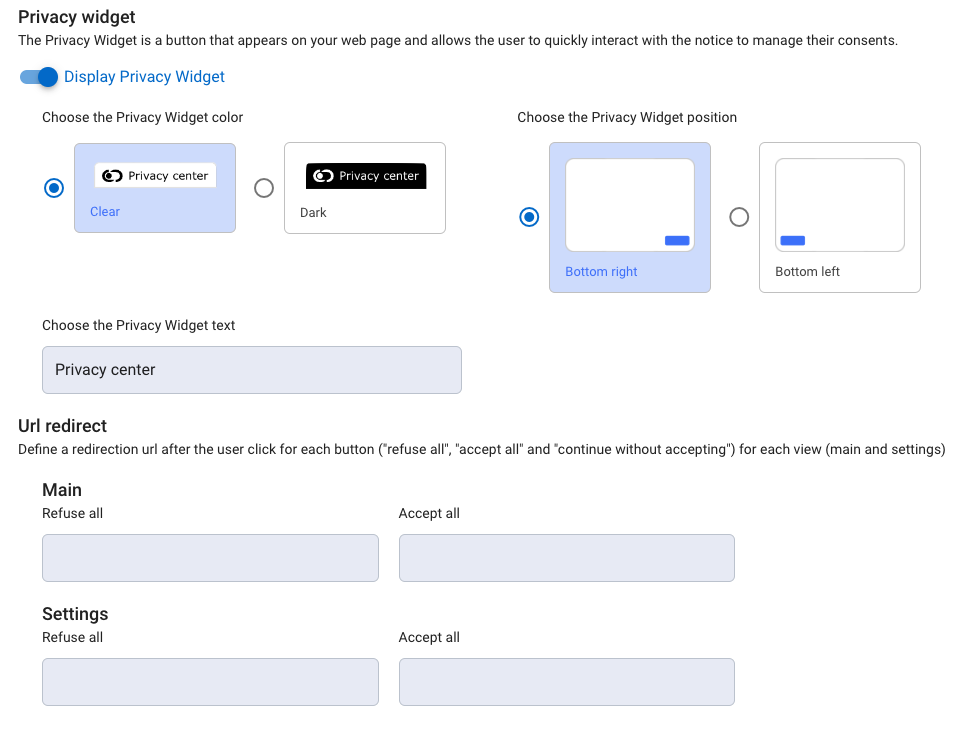
### Privacy widget
This option enables you to activate the privacy widget and configure its display (colour, position and text). [**More information**](/go-further/compliance/display-privacy-widget.md)
### Url redirect
The CMP offers the option of defining redirection urls after the click for each consent button ("refuse all", "accept all" and "continue without accepting") on each page (main and settings).
## **UI customization**
*\[ Standard, Essential & Premium Plans ]*
### Banner pictures
* **Add a logo or icon** : Your image will be displayed on your banner
When you add a logo to your banner, you can now choose how the text is arranged around it.
By default, the logo and the banner title are aligned side by side. You can also enable a new text-wrap layout: the text flows around the logo instead of staying beside it, so more content fits in the same space.
{% hint style="info" %}
This layout option is available on the Clear CMP only.
{% endhint %}
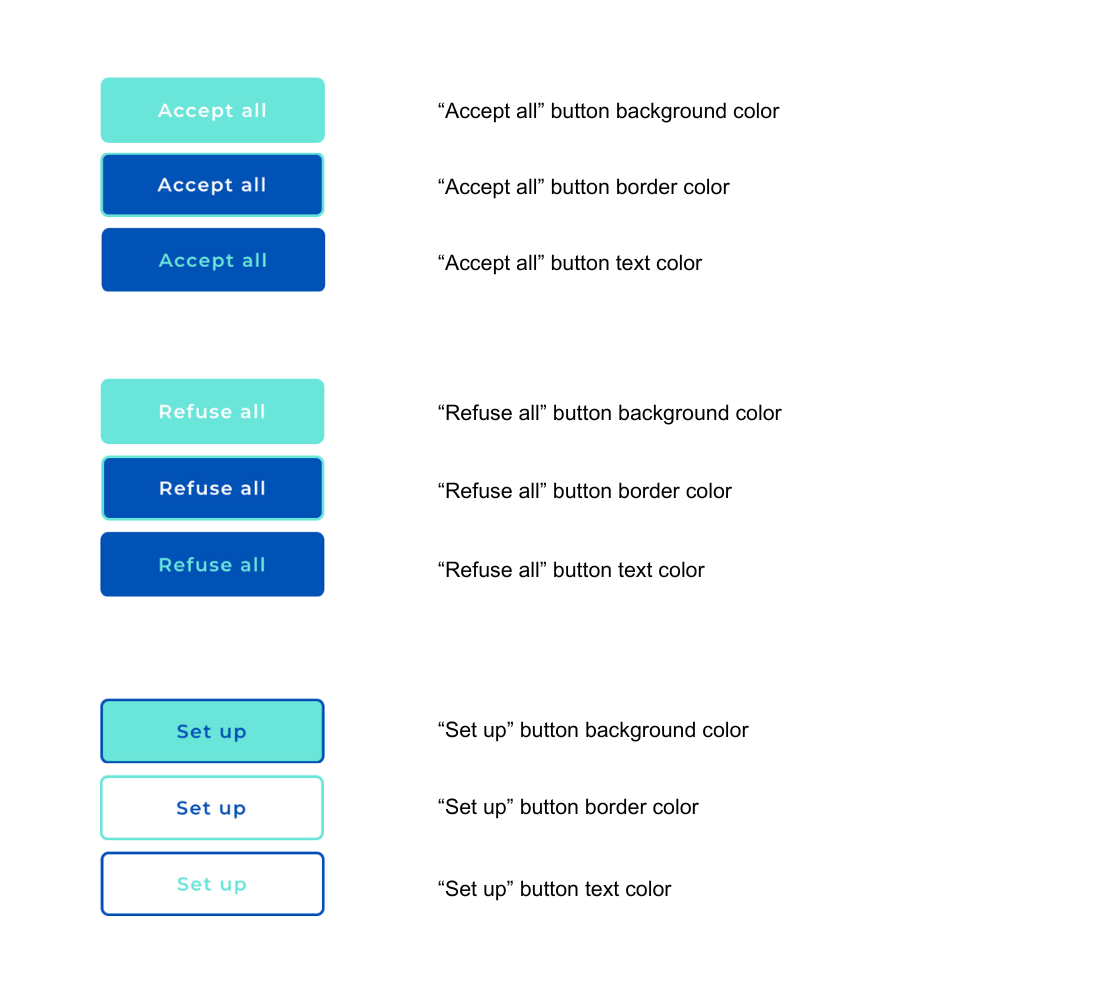
### Buttons and texts color
{% hint style="info" %}
**NOTE**
If you do not fill any color codes, then the default colors will be applied.
{% endhint %}
#### **Header and background**
{% tabs %}
{% tab title="Clear template" %}
{% endtab %}
{% tab title="Classic template" %}
{% endtab %}
{% endtabs %}
#### **Consent buttons**
{% tabs %}
{% tab title="Clear template" %}
{% endtab %}
{% tab title="Classic template" %}
{% endtab %}
{% endtabs %}
{% hint style="danger" %}
**ATTENTION**
Following the latest declarations of the CNIL, we insist that you do not favor one CTA over another. The European regulator is particularly attentive to this subject. For example, if you change the style ( background, size...) of an Accept button, you must apply the same style to the **Configure** or **Reject** button.
{% endhint %}
#### **Switches**
{% tabs %}
{% tab title="Clear template" %}
{% endtab %}
{% tab title="Classic template" %}
{% endtab %}
{% endtabs %}
### Custom CSS
#### Additional CSS code
Example of full CSS customization for Classic banner
```css
/* ---- Modal container ---- */
.banner--modal {
background: linear-gradient(135deg, #dfe4ff 0%, #e9d8fd 50%, #ffd6e8 100%) !important;
border: solid 1px #fff !important;
}
/* ---- Description text ---- */
.banner__mainContent {
background: rgba(255, 255, 255, 0.45) !important;
border-left: 3px solid #6c5ce7 !important;
border-radius: 10px !important;
padding: 14px 18px !important;
}
/* ---- Buttons ---- */
.button {
border-radius: 12px !important;
font-weight: 600 !important;
color: #6c5ce7 !important;
}
.button:hover {
cursor: pointer;
}
.button span {
color: #6c5ce7 !important;
}
/* ---- Link ---- */
a {
color: #6c5ce7 !important;
}
/* ---- Button accept all ---- */
.button__acceptAll {
background: linear-gradient(135deg, #6c5ce7 0%, #a29bfe 100%) !important;
border-color: rgb(162, 155, 254, 0.8) !important;
color: #ffffff !important;
box-shadow: 0 8px 20px -6px rgba(108, 92, 231, 0.6) !important;
}
.button__acceptAll span {
color: #ffffff !important;
}
.button__acceptAll:hover {
box-shadow: 0 12px 26px -6px rgba(108, 92, 231, 0.75) !important;
}
/* ---- Button refuse all ---- */
.button__refuseAll {
background: transparent !important;
border-color: rgba(108, 92, 231, 0.8) !important;
color: #6c5ce7 !important;
box-shadow: none !important;
}
.button__refuseAll:hover {
background: rgba(108, 92, 231, 0.08) !important;
border-color: #6c5ce7 !important;
box-shadow: 0 6px 16px -8px rgba(108, 92, 231, 0.5) !important;
}
/* ---- Button set up ---- */
.button__openPrivacyCenter,
.button__openPrivacyCenter:hover {
background: transparent !important;
border-color: transparent !important;
box-shadow: none !important;
transform: none !important;
}
.button__openPrivacyCenter {
position: relative !important;
color: rgb(108, 92, 231) !important;
}
.button__openPrivacyCenter::after {
content: "" !important;
position: absolute !important;
left: 50%; bottom: 6px !important;
width: 0; height: 2px !important;
background: #6c5ce7 !important;
transition: width 0.25s ease, left 0.25s ease !important;
}
.button__openPrivacyCenter:hover::after {
width: 60% !important;
left: 20% !important;
}
```
Example of full CSS customization for Clear banner
```css
.modal__container {
background: linear-gradient(135deg, #dfe4ff 0%, #e9d8fd 50%, #ffd6e8
100%) !important;
border-radius: 18px !important;
border: solid 1px #fff !important
}
.title {
background: linear-gradient(135deg, #6c5ce7 0%, #a29bfe 100%) !important;
-webkit-background-clip: text !important;
background-clip: text !important;
-webkit-text-fill-color: transparent !important;
font-weight: 700 !important;
letter-spacing: -0.01em !important;
}
/* ---- Buttons ---- */
.button {
border-radius: 12px !important;
font-weight: 600 !important;
color: #6c5ce7 !important;
}
.button:hover {
cursor: pointer;
}
/* ---- Button accept all ---- */
.button__acceptAll {
background: linear-gradient(135deg, #6c5ce7 0%, #a29bfe 100%)
!important;
border-color: rgb(162, 155, 254, 0.8) !important;
color: #ffffff !important;
box-shadow: 0 8px 20px -6px rgba(108, 92, 231, 0.6) !important;
}
.button__acceptAll:hover {
box-shadow: 0 12px 26px -6px rgba(108, 92, 231, 0.75) !important;
}
/* ---- Button refuse all ---- */
.button__refuseAll {
background: transparent !important;
border-color: rgba(108, 92, 231, 0.8) !important;
color: #6c5ce7 !important;
box-shadow: none !important;
}
.button__refuseAll:hover {
background: rgba(108, 92, 231, 0.08) !important;
border-color: #6c5ce7 !important;
box-shadow: 0 6px 16px -8px rgba(108, 92, 231, 0.5) !important;
}
/* ---- Button set up ---- */
.button__openPrivacyCenter,
.button__openPrivacyCenter:hover {
background: transparent !important;
border-color: transparent !important;
box-shadow: none !important;
transform: none !important;
}
.button__openPrivacyCenter {
position: relative !important;
color: rgb(108, 92, 231) !important
}
.button__openPrivacyCenter::after {
content: "" !important;
position: absolute !important;
left: 50%; bottom: 6px !important;
width: 0; height: 2px !important;
background: #6c5ce7 !important;
transition: width 0.25s ease, left 0.25s ease !important;
}
.button__openPrivacyCenter:hover::after {
width: 60% !important;
left: 20% !important;
}
```
{% hint style="info" %}
**NOTE**
**CSS** : You can past specific CSS rules to customize the UI and adapt it. You can change the background color and so on.
Example:
`.banner--modal {`
`background: white!important;`
`color: #656565!important;`
`}`
`.title {`
`color: #656565!important;`
`}`
The CSS rules are common for each languages.
{% endhint %}
#### Additional CSS code for AMP
If you're using AMP, put in this field the same code as above.
{% hint style="info" %}
**INFO**
If Additional CSS code for AMP is empty, the classic CSS will be applied to all notices, including AMP.
If Additional CSS code for AMP is filled in, it will be applied to AMP notices, the classic CSS will be applied to other notices.
{% endhint %}
## **Google Consent Mode (GCM) settings**
Enable GCM (Google Consent Mode) so that Google Analytics is controlled by the CMP. See the [**AppConsent configuration for Google Analytics**](/configuration/step-3-notice-implementation-web-app-tv/google-gtm/manage-google-analytics.md) section.
### Enable TCF integration with GCM
Allows Google to use the IAB Transparency & Consent Framework to send consent signals to Google tags. [**Learn more**](https://developers.google.com/tag-platform/security/guides/implement-TCF-strings)
### Enable GCM Basic Consent Mode
Delay the loading of Google tags until the user interacts with the notice, thereby regulating data transmission. [**Learn more**](https://support.google.com/google-ads/answer/10000067?hl=en\&sjid=11442004191081153688-EU).
### Countries to exclude
Allows you to define a list of countries in which Google Consent Mode will not be applied.
### Url\_passthrough
When this property is activated, Google can transmit information in the URL about ad clicks. [**Learn more**](https://developers.google.com/tag-platform/security/guides/consent?hl=en\&consentmode=advanced#passthroughs).
### Ads\_data\_redaction
Used to hide ad data when ad\_storage is set to **denied**. [**Learn more**](https://developers.google.com/tag-platform/security/guides/consent?hl=en\&consentmode=advanced#redact_ads_data).
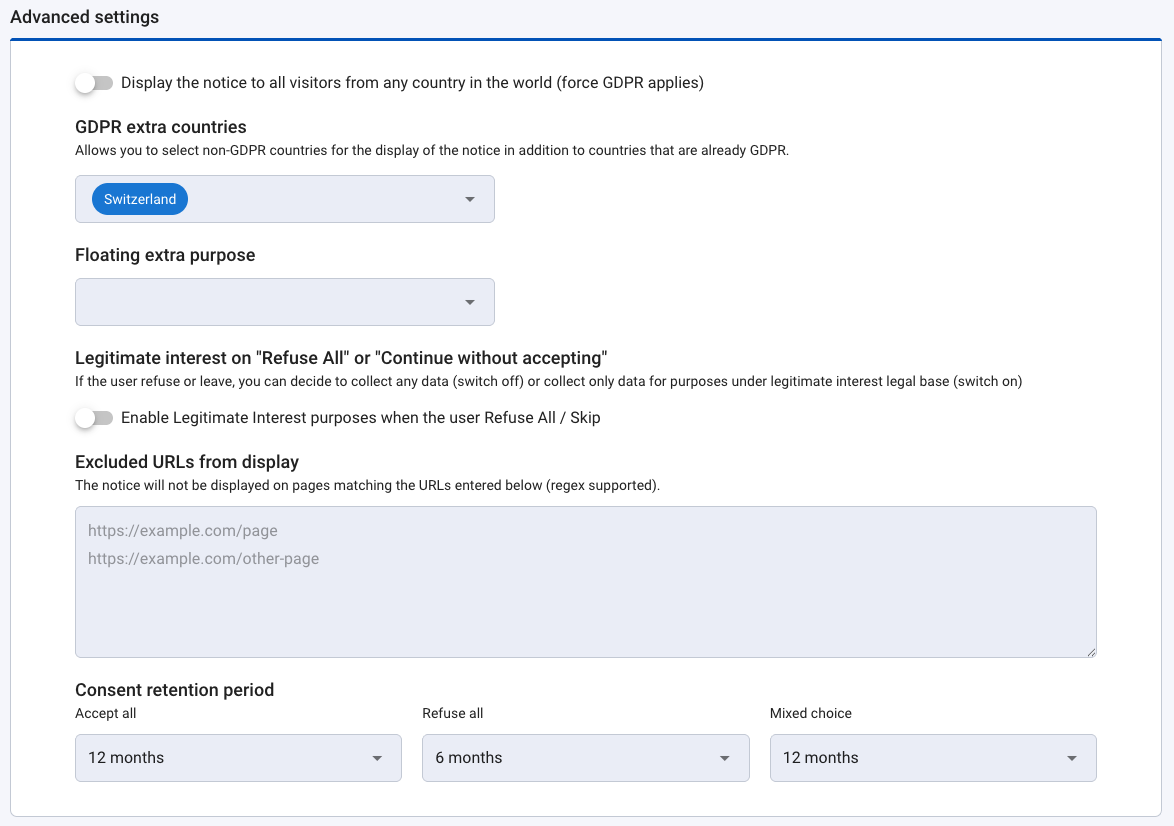
## **Advanced settings**
### ForceGDPRApplies
Enables you to force the notice to be displayed for all visitors from any country in the world.
### GDPR extra countries
When this property is configured, the notice will only be displayed for the list of countries selected, in addition to countries already displayed according to the rules defined by the RGPD.
### Floating extra purpose
A floating purpose is a purpose for which only the storage of the consent is concerned. See the **Floating purpose feature** section.
{% hint style="info" %}
**NOTE**
The text part is managed on your side. In the case of Floating, it is a new API save-floating-purpose route that receives them with the UUID, the AppKey of the notice as well as the possible External IDs. The consent payload is stored separately in another table. If the payload contains an external ID it must be saved as it is at the moment in order not to lose the correspondence UUID/ContractID etc.
{% endhint %}
### Enable Legitimate Interest purposes when Refuse All/Continue without accepting (skip)
If the user refuses or leaves, you can decide to collect any data (switch off) or collect only data for purposes under a legitimate interest legal base (switch on)
{% hint style="info" %}
**NOTE**
As recommended by the Italian regulator, the Garante, our **Continue without accepting** link is automatically replaced by a cross for all web notices, for whom the user browser is in Italian. This cross has the same effect as our link Continue without accepting: close the notice with no consent.
{% endhint %}
### Excluded URLs from display
You can prevent the notice from being displayed by entering either a specific URL or a regular expression matching the pages to exclude. For example, for a Privacy Policy page, you can provide its full URL directly or define a regex targeting its path. Any URL matching the entered value will not trigger the display of the notice.
### Consent retention period
These default values, which we recommend, allow you to be in compliance while maximizing your consent rates. Those durations represent the time lapse before the consent notice will be displayed again and consent will be sought once more.
* Accept all: **12 months**
* Refuse all: **6 months**
* Mixed choice: **12 months**
* (If applicable) Continue without accepting: **3 days**
You can modify the durations at any time.
{% hint style="info" %}
If you have created your consent notice before October 28th, 2021, the default settings for mobile consent notices are on 12 months for all choices. Feel free now to adjust them.
{% endhint %}
## Save the notice
{% hint style="success" %}
Then click on **Save**. The notice in Production is updated and ready to be implemented in your application.
{% endhint %}
Each update is stored in a specific ledger in our blockchain stack. We store the whole notice and the text altered, precise timestamp, account\_id, consoleUserID, and so on.